A couple of months ago, we announced some major improvements to our Participation Reports dashboards. In addition to supporting additional record types (Grants, Datasets, etc.) and some additional key metadata elements (ROR IDs, Funding Award Numbers), the revamped Participation Reports includes a long sought after feature: Gap Reports.
Since we first launched Participation Reports in 2018, and as we’ve been featuring them in Metadata Health Check webinars in intervening years, members expressed that they were pleased to see how they were doing on metadata comprehensiveness and where they were falling short. The completely reasonable and expected follow up was often “so, how do we do better?” And, in particular, members wanted lists of DOIs that were missing one or another of the key metadata elements, so that they knew which items to update.
That’s where the new Gap Reports feature comes in to..well, fill the gap. Let’s walk through an example.
Take a look at the “Society of Psychoceramics” Participation Report. This is an internal Crossref account that we use for testing and mocking up metadata examples, so the metadata coverage is particularly inconsistent.

Some things to note here:
- The date range is set to “All time” (not “Current records” or “Back records”)
- The record type selected is set to Journal Articles
- The metadata coverage information that’s displayed pertains to just the selected date range and record type

Up top, you can see the "Download Gap Report” button. When you select that, you’ll be presented with options to select the date range, record type, and metadata elements for your report. Once you’ve selected the options you want, click “Download Gap Report” once more, and your csv file will download.

In this example, I opted to get a report listing journal article DOIs that are missing ROR IDs and ORCID IDs. This is an excerpt of the resulting csv file.
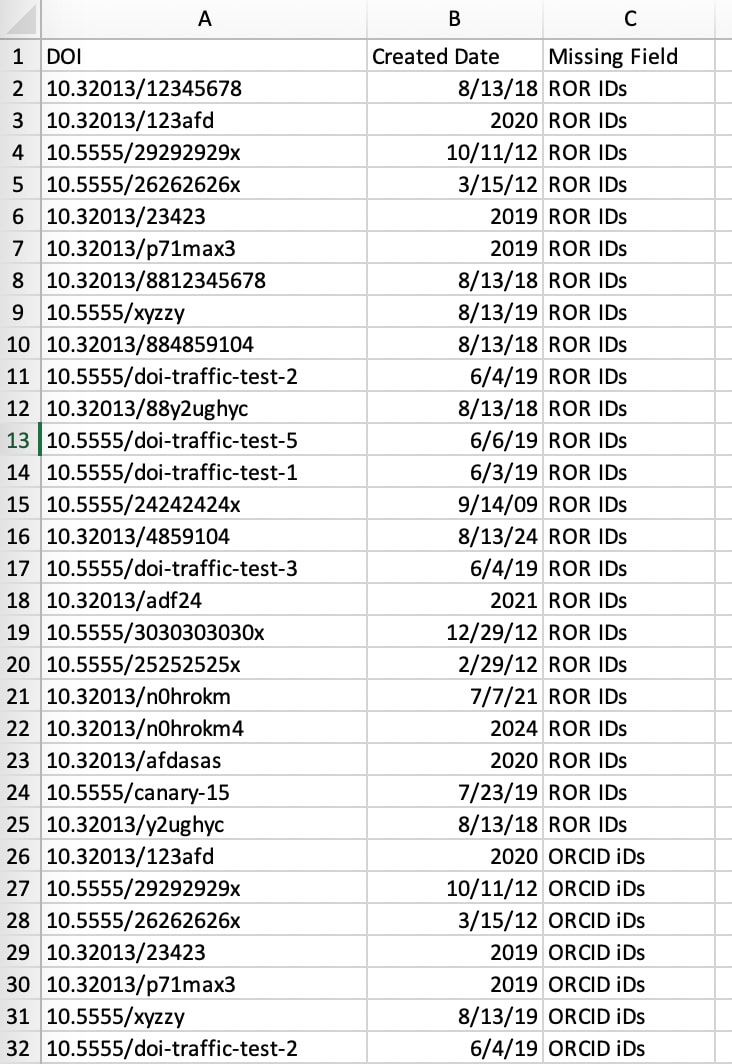
You can see that if a DOI has neither ORCID IDs nor ROR IDs in its metadata record, it will appear twice in the report. For example 10.32013/123afd appears here in rows 3 and 26. For that reason, you might find it more useful to download individual reports for each metadata element that you’re intending to update.
Once you know which DOIs are missing which metadata elements, then you can consider whether and how to update them.
If you hover over the “i” info icons to the upper right of each element displayed on your participation report, you’ll find links to the relevant section on our Participation Reports documentation page. And, from there, you can follow the subsequent links to specific instructions on how to update that particular type of metadata.
For example, this is what the more info box looks like for the ORCID IDs element

Some metadata elements require the resubmission of full metadata records. These include: abstracts, ORCID IDs, affiliations, and ROR IDs.
Other metadata elements can be updated with resource deposits which allow you to only include the DOI being updated and just the new metadata for that one element. These include: references, Crossmark metadata, licence/text and data mining/Similarity Check URLs, funder IDs and funding award numbers.
We also have a few tools to make updates easier, including the Simple Text Query submission tool to add references to a DOI’s metadata record, and csv uploads for licenses, text and data mining URLs, Similarity Check URLs, and funding data (funder names, funder IDs, and award numbers).
Just a final note, when we say that a particular type of metadata is "missing” for a DOI, that just means it is absent from that DOI’s metadata record. That doesn’t necessarily imply that you should always add it in.
Not all types of metadata are relevant to all types of content. If you’re registering archival materials published hundreds of years ago, those authors cannot have ORCID IDs. If you don’t subscribe to the Similarity Check service, there’s no reason you would need Similarity Check URLs. If you publish materials for which there is no external funding, their records definitely won’t have funder IDs or funding award numbers. So, it’s not reasonable to expect 100% completeness across the board in all cases.
That’s all to say, the goal of these reports is to help you make your metadata as accurate and thorough as it possibly can be. What that ultimately means will vary depending on the nature of your content. As a general rule, more metadata is better (as long as it’s accurate and relevant), but only you can know what the best score is for your organization.